BadgeScan
Low-cost AI badge and business-card capture app for trade show exhibitors
Monthly subscription · Free trial
Category
In-person
Event formats
Startup
Company size fit
BadgeScan is a phone-based lead capture app that photographs printed badges or business cards and uses AI to extract contact details, so exhibitors can skip renting show lead-retrieval scanners. It adds booth traffic counting, follow-up email automation and spreadsheet exports, and works offline as a progressive web app. It's aimed at small exhibitors and individual reps, and was in public beta at the time of review.
badgescan.appVisit ↗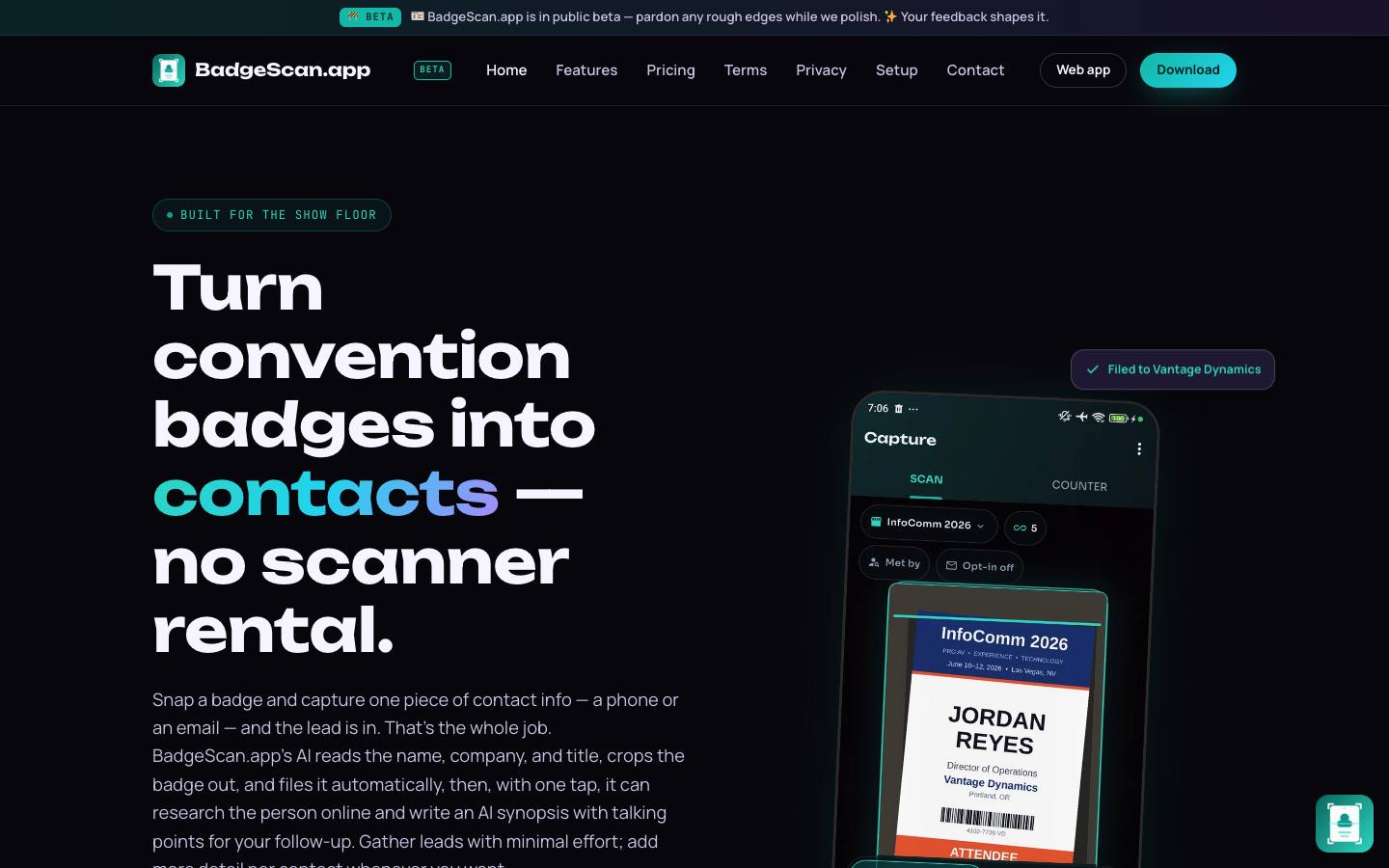
At a glance
- CRM
- –
- Security
- SOC 2 Type IInot foundISO 27001not foundGDPRdocumentedSAML SSOnot foundDetails
Who it's for
- Small exhibitors and solo reps at regional and national trade shows
- Teams that want inexpensive lead capture without show-rented scanners
- SMB
- Trade shows
- Conferences
How much does BadgeScan cost?
- Starting price
- $15/month
- Pricing model
- Monthly subscription
- Free plan
- No
- Free trial
- Yes, 3 days
Monthly plans from $15 (50 AI scans) to $100 (unlimited), plus your own AI usage; 3-day trial requires a card.
Strengths and considerations
What stands out
- Much cheaper than renting show lead-retrieval devices
- Captures leads from any printed badge rather than relying on show-specific scanners
- Works offline
Worth checking
- Public beta product from a very small developer; company details aren't published
- No direct CRM integrations, only file exports
- Contacts are retained for about three months unless backed up
Key features
- AI badge captureReads name, company and title from a photo of a badge or business card and files the lead by company and show.
- Contact researchOptional search links and an AI-written synopsis with talking points for each lead.
- Follow-up automationPost-show emails to contacts who opted in.
- Booth counter and dashboardsCounts booth traffic and shows live capture dashboards.
- Exports and backupPDF, CSV and XLSX exports with backup to Google Drive, Dropbox, Box or OneDrive.
- Offline PWAInstallable web app that syncs captured leads when back online.
Integrations
- Google Drive
- Dropbox
- Box
- OneDrive
- OpenAI
- Anthropic
- Azure OpenAI
No CRM connectors or Zapier; leads go out as PDF, CSV or XLSX exports, and AI reads run on your own provider key.
Security & IT pre-check
What BadgeScan publicly documents on its own website, checked 2026-10-18. "Not found" means we couldn't find it on public pages; many vendors share documents on request or under NDA.
- SOC 2 Type II: not found
- SOC 2 Type I: not found
- ISO 27001: not found
- GDPR compliance: documented · source
- Data processing agreement (DPA): documented · source
- CCPA / CPRA: documented · source
- PCI DSS: not found
- Subprocessor list: documented · source
- EU data hosting: not found
- HIPAA: not found
- SAML single sign-on: not found
- SCIM user provisioning: not found
- Public API: not found
- Webhooks: not found
- Accessibility report (VPAT/ACR): not found
- Accessibility statement: not found
- Trust center: not found
- Public status page: not found
- Published pricing: documented · source
- Public changelog: not found
Buying details
From BadgeScan's own website, checked 2026-10-18.
- Event formats
- In-person
- Implementation
- Self-serve: install the app, add an AI API key and start capturing the same day.
- Support
- Email (support@badgescan.app) and in-app docs.
- Contract
- month-to-month
- Languages
- English
AI capabilities
- AI extraction of contact fields from badge and business-card photos
- AI-generated lead synopsis with talking points
- Bring-your-own OpenAI or Anthropic API key
- Beta on-device badge reading without a cloud AI provider
Questions to ask in a BadgeScan demo
5 questions
Written by our editors from the vendor's public information. Use them to get specific answers before you sign.
- 1. Which legal entity provides the app, and what support is available during a show?Why ask: It's a public beta from a very small developer with no company details published.
- 2. When using our own OpenAI or Anthropic key, what data is sent to the provider, and how much does a typical scan cost in AI usage?Why ask: Bring-your-own API key is required for AI features on top of the subscription.
- 3. How do leads get into Salesforce or HubSpot without direct CRM integrations?Why ask: Only file exports and cloud storage are supported.
- 4. Can contact retention be extended beyond about three months, and how is data deleted?Why ask: Contacts are retained for about three months unless backed up.
- 5. How reliable is the beta on-device badge reading compared with the cloud option?Why ask: On-device reading is in beta.
BadgeScan alternatives
Ranked by how closely each product matches: the problems it solves, company sizes and event programs it serves, and shared integrations.
 BoothIQLead capture & retrieval
 LeadCaptyrLead capture & retrieval
 SpeakSoonLead capture & retrieval
 snapADDYLead capture & retrieval
 Gather CaptureEvent attribution & integrations
 Lead LiaisonLead capture & retrieval
 MoblyAI for events
 PoplLead capture & retrieval
 QuickTapSurveyLead capture & retrieval
 Scan2LeadLead capture & retrieval
More on BadgeScan
Event programs it fits
BadgeScan FAQ
What is BadgeScan?
How much does BadgeScan cost?
What does BadgeScan integrate with?
What are the best BadgeScan alternatives?
Is BadgeScan SOC 2 compliant?
Last verified 2026-10-18. How we research. Sources: badgescan.app